Mileage and reimbursements
Use Accounting → Mileage to keep a work-trip log and review money owed back to your team. A trip in someone's own vehicle creates a mileage expense at the business's configured rate. A trip in a business vehicle records distance without creating a mileage repayment.
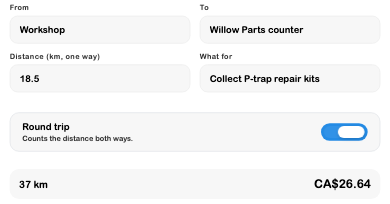
For example, a technician drives 18.5 km from the workshop to a parts counter and returns. Round trip makes the recorded distance 37 km. At the demo business's configured 72¢/km, the amount is CA$26.64. This is an illustrative configured rate, not a current government allowance.
Mileage Tracking
Check the unit and business rate
The mileage toolbar shows the current rate and unit. With accounting management access, choose Change rate, enter the cents per kilometre or mile, select the distance unit, and Save.
The rate dialog currently references 2025 defaults. Check and configure the rate appropriate to the business and the trip before relying on it. SRVZr uses the configured per-unit amount; this screen does not establish whether a reimbursement qualifies for a particular tax treatment or allowance tier.
Log a trip
- Choose Log a trip.
- Select Own vehicle or Business vehicle.
- Set the actual trip date. A person with accounting management access can select another available team member as Driver; otherwise log your own trip.
- Enter From, To, and a useful What for description. A location name is often enough; avoid unnecessary personal addresses.
- Enter the one-way distance in the displayed unit.
- Turn on Round trip only when that distance should count twice.
- Check the calculated distance and amount, then choose Save trip.
- Find the saved trip in the period list and reopen it to check the route, purpose, distance, and vehicle choice.
The period picker filters the mileage list. Totals summarize each driver's distance and amount, and the trip row identifies a business vehicle, round trip, or reimbursed trip where applicable. Entered distances are manual; this workflow does not demonstrate automatic GPS tracking.
Select an unreimbursed trip to correct it. Editing can recalculate its amount with the current configured rate, so review the result if rates have changed. Reimbursed trips are protected from editing; correct the reimbursement first when necessary. Deleting an eligible trip also removes its linked mileage expense.
Employee Reimbursements
Owed to team combines unreimbursed personal-vehicle mileage with expenses recorded as paid personally. It groups the outstanding items by person, so a repayment can cover selected items rather than the entire balance.
Review and record a repayment
- Open Owed to team.
- Find the person and choose Reimburse. This action requires permission to manage bills.
- Tick only the expenses or trips included in this repayment. The button total follows your selection.
- Choose Paid from, the actual repayment Date, and How it was paid.
- After arranging the actual repayment, choose Pay back to record it.
- Check Paid back, then confirm the outstanding balance decreased by the selected amount.
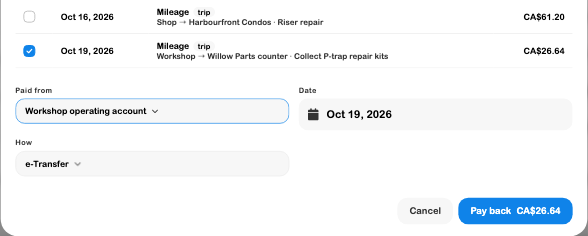
Pay back records a reimbursement in the books; it does not send an e-Transfer or initiate a bank payment. The account and method describe the repayment you are recording. No real funds were sent in this example.
Use Undo beside an incorrect repayment record to return its items to the owed list, then record the correction. Undoing the bookkeeping record does not recover money already sent to someone.
Common questions
| Situation | Next step |
|---|---|
| The amount is twice what you expected | Check whether you entered the total distance and also enabled Round trip. Enter the one-way distance when that switch is on. |
| A business-vehicle trip has no amount | This is expected: the distance is logged without personal mileage reimbursement. |
| A personal expense is missing from Owed to team | Check its paid-personally choice, person, and whether it is already part of a reimbursement. |
| A trip is missing from the list | Check the date filter and selected business. The owed list serves a different purpose from the period-filtered trip log. |
| A reimbursed trip cannot be changed | Review the repayment record before undoing it and correcting the trip. |
| Reimburse or Change rate is unavailable | Ask the account manager to review the relevant bills or accounting permissions. |
See Expenses for spending records, Banking for account activity, and Team for staff access.