Stints
Stints packages a defined job that can involve a compatible robot and remote operation. The business offering, the customer intake flow and the physical execution need separate preparation. A listing or saved flow is not proof that a robot is available or that the job can run autonomously.
Stint Flows
A Stint flow defines the workflow customers complete for the offering. For an inspection rehearsal, that might collect the affected fixture and access constraints before the business reviews what equipment and operator are needed.
- Open Marketplace and inspect an appropriate Stint Template, or create a Stint-type flow in Flows.
- Select a template to create a local draft. Give the copy its own name and inspect every node and connection.
- Configure its required published form and any other resources. A template that displays No form selected still needs setup. Review the editor's errors and warnings before continuing.
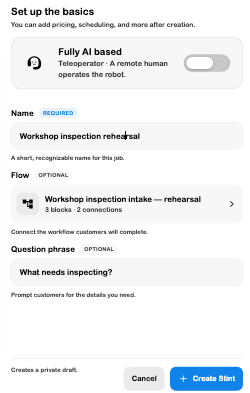
- Save the draft. In Stints → Create Stint, choose that flow with the Flow selector. The selector displays the selected name, block count and connection count.
- Enter the Stint name and a useful Question phrase. Review the card preview and intended operating mode.
- Create the offering only when ready. Creating a Stint with a local flow can publish that flow to obtain a shared reference, and can create an associated Bank. The offering itself begins as a private draft; this does not make creation a purely local action.
- Review the offering's actual configuration, availability and access before making it available. Handle resulting work through Requests → Stints and inspect its real operational state.
Choose the operating mode honestly
The inspected creation dialog defaults to Teleoperator, described as a remote human operating the robot. It also offers a Fully AI based switch. The selected mode describes intended operation; it does not install a policy, assign a compatible robot or demonstrate autonomous completion.
For remote work, make the operator's objective, environment, stopping conditions and handoff clear. For AI-based work, review the compatible hardware, policy, required inputs and actual tested limits. Use Policies, Servos and Remote operation for those separate workflows.
A template is a starting point
The inspected Marketplace template contained User → Work Order Form → Stint, but had no selected form and the editor showed an error with Next unavailable. It was useful for understanding the path, not a ready-to-run job. Its local copy survived reload after renaming and saving. No customer submission or robot execution was tested.
A Preset Flow can describe a reusable provider network with pools, slots and dispatch; see the flow and node manuals for the supported configuration. Do not assume enabling the option automatically supplies participating businesses, robots or schedules.
Joinable Stints
The Stints page also lists joinable offerings. Review the particular job, operating mode, location and participation requirements before joining. A visible listing is separate from local availability and fulfilled work. Joining and dispatch were not exercised in this review.
Troubleshooting
- Flow is unavailable: check its type, saved state and permissions, then reopen the selector.
- Next is blocked: inspect the editor's actual errors, including missing published forms or disconnected requirements.
- Offering exists but cannot run: check the operational setup and compatible resources rather than repeatedly recreating the listing.
- Autonomy is unclear: use the selected operating mode and verified execution evidence; do not infer it from the Stint name or card image.