Nodes & Connections
Flow Builder graphs are made from nodes and edges. Nodes are the modules that collect, transform, branch, schedule, price, or complete work. Edges are the typed connections that pass a user path or data between them.
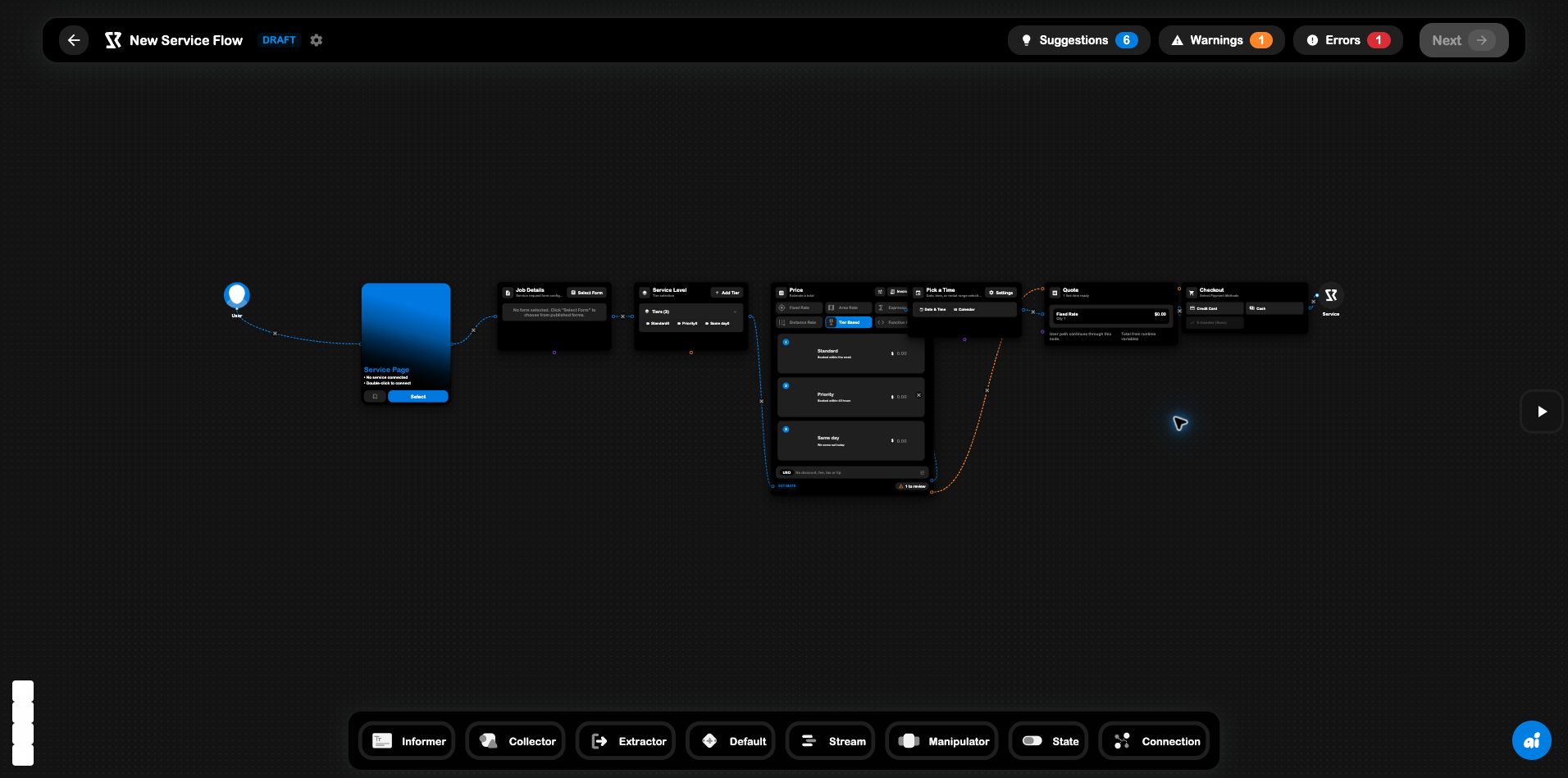
The required flow shape
The core user path starts with a User node and ends at the flow’s domain endpoint:
User → page/entity → collection → logic/pricing → outcome → endpoint
For a Service Flow, that usually means User → Service Page → Work Order Form → … → Service. The page node is the link to the published Service experience; it is not the same thing as the final Service endpoint.
Every connection should answer two questions:
- Does the user path continue? The next node must be reachable when the previous node completes.
- Does the next node receive the data it needs? A calculator, conditional, splitter, quote, or checkout must receive the relevant variable channel from upstream.
Connection channels
Edges are typed. The UI uses different colors to make those channels legible on the canvas:
| Channel | What it carries | Typical use |
|---|---|---|
| User flow | The customer’s path through the experience | User → form → pricing → checkout |
| Work order | Work-order context | A form or work-order node feeding another node |
| Information | Entity or contextual information | Service, rental, event, or account context |
| Payment | Price and payment data | Calculator → Quote → Checkout |
| Servo types | The supported robot types | Servo Types → Servo in a Stint Flow |
| Policies | The policies a servo should follow | Policies → Servo |
An edge can be visually close to another edge while still carrying a different channel. When a node appears configured but does not run, check that the incoming edge is connected to the correct input handle, not only that a line is visible.
Complete node reference
Entry, entity, and endpoint nodes
| Node | What it does | Where it is used |
|---|---|---|
| User | The person entering the flow. Every user flow needs one. | All flow types |
| SRVZr | Represents the business/account context behind a flow. | Services, rentals, events |
| You | Represents the flow owner or preset maker. | All flow types |
| Service Page | The published page customers arrive on. Connect it to the Service record. | Service |
| Rental Page | The published page renters arrive on. | Rental |
| Stint Page | The work page workers arrive on. | Stint |
| Event Page | The event page attendees arrive on. | Event |
| Service | The service being requested; the terminal endpoint for a service flow. | Service |
| Rental | The rental being booked; the terminal endpoint for a rental flow. | Rental |
| Stint | The stint the worker takes; the terminal endpoint for a stint flow. | Stint |
| Servo | The robot that performs the work. | Stint |
Collection and context nodes
| Node | What it does | Important configuration |
|---|---|---|
| Work Order Form | Collects job details through a published form. | Select a published form; it must receive input from the user flow and continue to another node. |
| Bank | Reads stored data from a selected bank and exposes it downstream. | Choose the bank and field in the node editor. |
| Tiers | Lets the customer choose among options such as Standard, Priority, and Same day. | Add tiers with names, descriptions, and prices. |
| Scheduling | Collects a date, time, or range. | Choose date/date-time/range mode, slots, working days, and booking limits. |
| Pickup Location | Collects a renter-entered pickup address. | Rental flows only. |
Logic and transformation nodes
| Node | What it does | Important configuration |
|---|---|---|
| Calculator | Computes a total from upstream values. | Fixed, tiered, expression, distance, or function pricing; currency, rounding, adjustments, and result variable. |
| Conditional | Splits the path into True and False branches using a comparison. | Variable, type, operator, comparison value, and optional script. Both outputs need a safe continuation. |
| Splitter | Splits the path into multiple cases using one variable, like a switch statement. | Switch variable and at least one case; every case output must be connected. |
| Rental Rules | Applies rental terms or weekday restrictions. | Define the rules the renter must agree to. |
| Timing & Pricing | Prices a rental by billing period and duration limits. | Unit price, hourly/daily/weekly/monthly period, minimum and maximum units. |
Payment and fulfillment nodes
| Node | What it does | Important configuration |
|---|---|---|
| Quote | Presents the calculated line items before payment. | Connect pricing data and configure the quote/invoice presentation. |
| Checkout | Collects payment using the selected methods and terms. | Payment methods, pay-in-full/deposit/pay-later terms, line items, and invoice template. |
| Servo Types | Declares which robot types can execute a Stint. | Select at least one supported servo type and connect it to Servo. |
| Policies | Selects the rules a servo follows while doing the work. | Choose a saved policy or policy template. |
A Service Flow, node by node
The built-in Quote & Pay pattern illustrates the intended order:
- User , starts the experience.
- Service Page , identifies the published service page.
- Job Details , collects the request form.
- Service Level , collects a tier choice.
- Price , turns the selected tier into a total.
- Pick a Time , collects the desired booking time.
- Quote , presents the priced result.
- Checkout , collects payment.
- Service , completes the service path.
The Calculator also has a payment-data edge into Quote. That second connection is why the quote can display a calculated line item even though the main user path enters it from Scheduling.
Node configuration and variables
Nodes publish values for downstream nodes. A variable is only available after the node that produces it has run in the user path. For example:
- a Work Order Form can publish customer/job fields;
- Tiers can publish the selected tier;
- a Calculator can publish
serviceTotal; - a Conditional can read an upstream value and choose a branch;
- Quote and Checkout can read payment data from pricing nodes.
If a Conditional or Splitter says a variable is unavailable, move the source node earlier in the path or choose a variable that the current path actually produces.
The left-to-right position is a useful visual convention, but the edges are the source of truth. A node can be drawn nearby and still be disconnected; always follow the handles when debugging a flow.