Simulator
The Simulator is the execution preview for a flow. It runs the graph instead of only inspecting its configuration, so it can reveal runtime problems that static validation cannot see.
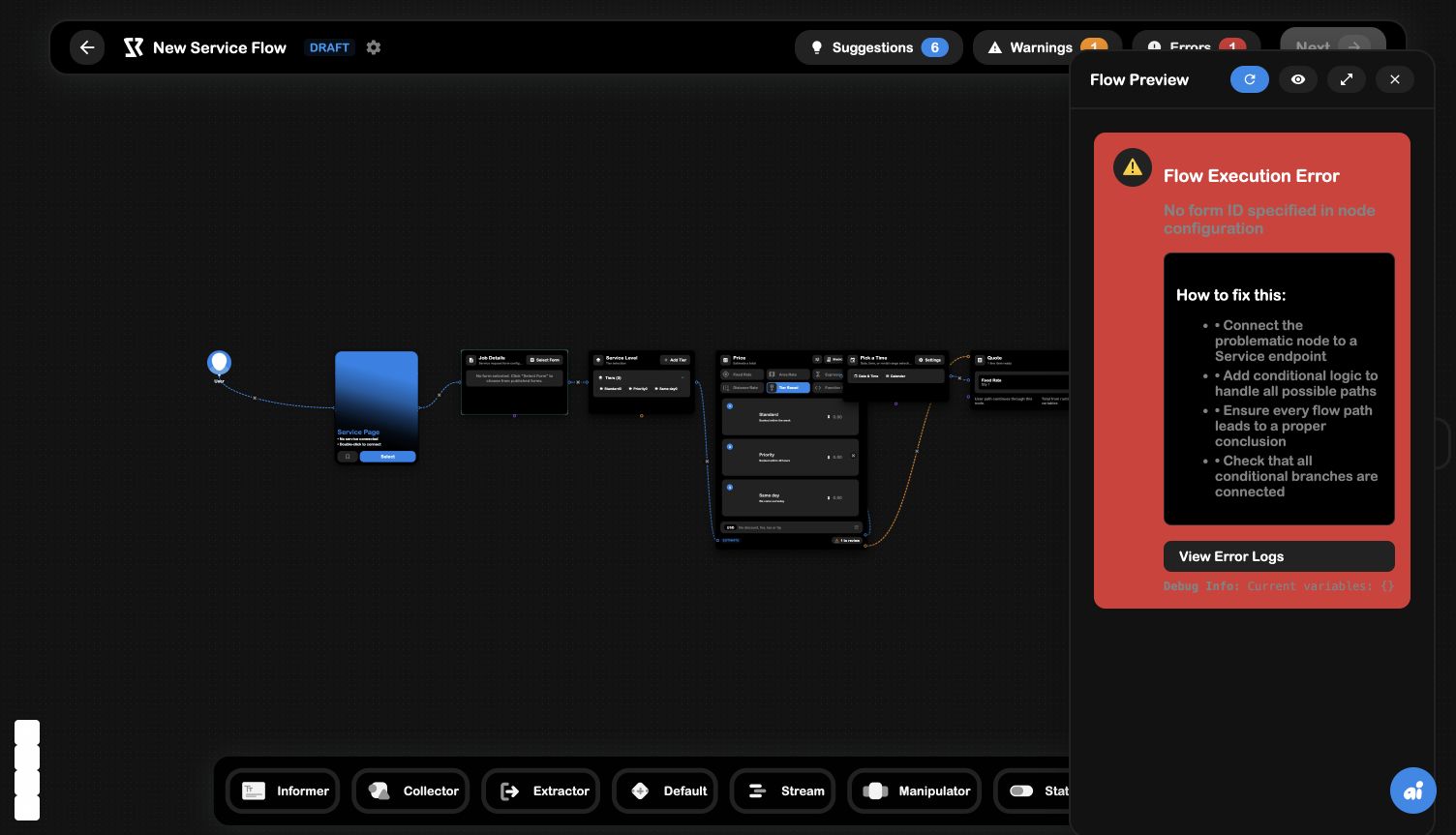
Open and control the simulator
Select the play control in the Flow Builder toolbar. The Flow Preview panel includes:
- Refresh , run the preview again after changing configuration;
- Visibility , toggle the preview presentation;
- Fullscreen , expand the preview for a larger test surface;
- Close , return to the canvas.
The simulator uses the current in-memory graph and its current node configuration. It does not make an invalid node valid; it gives you the execution-level evidence needed to fix the configuration.
What the simulator does
The executor walks the connected user path, collects form data, evaluates logic, stores runtime values, and records the steps or errors that occur. This is different from the diagnostics panel, which analyzes the graph without executing the full experience.
Runtime errors
In the captured example, the simulator reports:
No form ID specified in node configuration
That message means the graph reached the Work Order Form node, but the node had no selected published form at runtime. The simulator also shows How to fix this, including connecting the problematic node to a Service endpoint, handling all possible paths, and checking conditional branches.
The preview exposes View Error Logs and a debug snapshot such as the current runtime variables. Use those details to distinguish:
- a missing configuration value;
- a path that never reaches the expected node;
- a branch that ends without a valid conclusion;
- a runtime value that is not available when a node executes.
A practical test loop
- Resolve the top-bar Errors first.
- Open the Simulator.
- Follow the preview until it reaches the node under test.
- Use the error text and current variables to identify what the node received.
- Close the preview, update the node or edge, and refresh the simulation.
- Repeat until the full path reaches its endpoint.
An Error says the graph violates a known structural or configuration rule. A Flow Execution Error says the graph reached a runtime state it could not execute. You may need both panels to find the complete fix.