Routes and turn-by-turn navigation
Use Routes to turn a day's visits into an ordered route. A dispatcher can load booked jobs, add a supplier stop and review the route before the driver starts.
Prepare the stops
- Check the selected business and choose the date in Routes.
- Open Load data → Booked jobs for work orders booked on that day.
- Use From a bank for rows containing addresses, or From a map for places on a saved map. Review the source and address selection before importing.
- Add an extra place through Add a stop by address. Select the matching search result rather than leaving unconfirmed text.
- Read every stop's address and open its linked work order when needed.
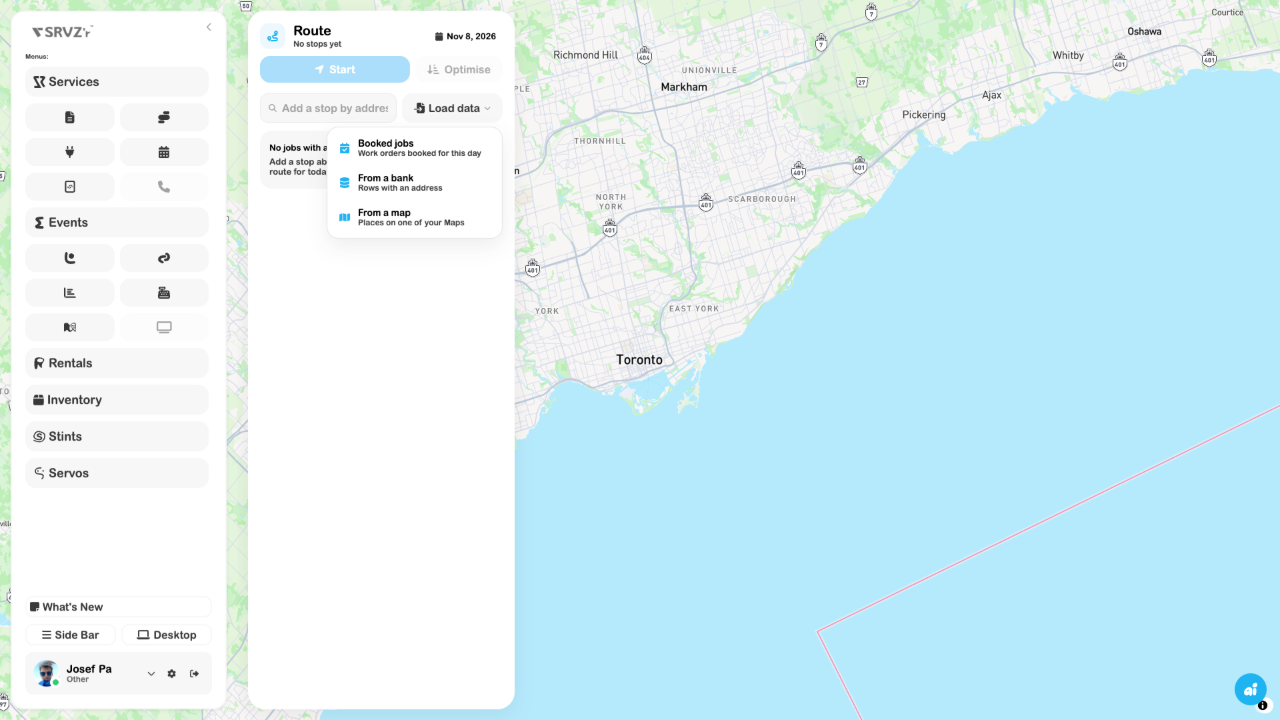
A day with no matching addresses is not a failed booking. Check the selected date, booking state and actual job addresses. A loading error is different from an empty result.
Review and optimise
Select Optimise to reorder the remaining visits using the available origin. Check the result against appointments and time constraints; an efficient driving order may still need a human adjustment. The stop controls let you move or remove stops. Touch layouts also offer swipe actions.
Arrived, Skipped and returning a stop to the route describe route progress. Verify a linked job's status separately. Removing a stop does not cancel the customer's work order.
Start navigation
Choose Start after the route contains remaining stops. Allow location access when needed, read the next instruction and use the recenter control if the map moves away from your position. End navigation when finished. Location, network access and routing availability affect guidance.
If Routes says it is saved on this device until enabled for the business, treat it as device-local planning. Confirm the route is available on the intended driver's device before relying on a handoff.
CarPlay and Android Auto
Supported native builds provide work-order access, the voice agent and SRVZr map guidance on CarPlay and Android Auto. Pair the phone using the vehicle's normal setup, open SRVZr and confirm the intended day's route before moving. Browser previews cannot verify a vehicle connection, native permissions, GPS accuracy or spoken directions.
The planner and Load data menu were inspected. Imports, a driven route, test-drive simulation and physical vehicle integration were not exercised for this guide.