Checkout node
Checkout
Checkout marks the flow's commercial path as ready for checkout. It receives the runtime total and allowed payment methods, then passes the user to the appropriate Service, Rental or other endpoint. Configuring this node does not charge a customer.
Configure the node
- Connect the customer path into Checkout and onward to the intended endpoint.
- Ensure pricing and quote inputs reach it. Check the actual customer Preview rather than relying only on the canvas sample.
- Select the allowed payment methods. Credit Card requires the business's verified Stripe connection; Cash is a separate option. The reviewed editor labels E-transfer (Soon) as unavailable.
- Choose Pay in full or Deposit. For a deposit, choose % of total or Fixed amount, enter the value, and leave the field to commit it.
- Save, reload, and review the displayed total, amount due now and later balance in Preview.
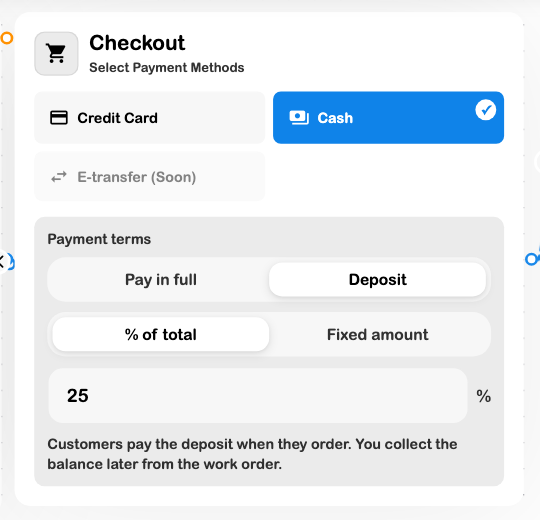
The editor allows percentage deposits from 1–99%. A fixed amount that reaches the total behaves as full payment. The server uses the published node's terms and verified total when processing a real order.
Review the customer's breakdown
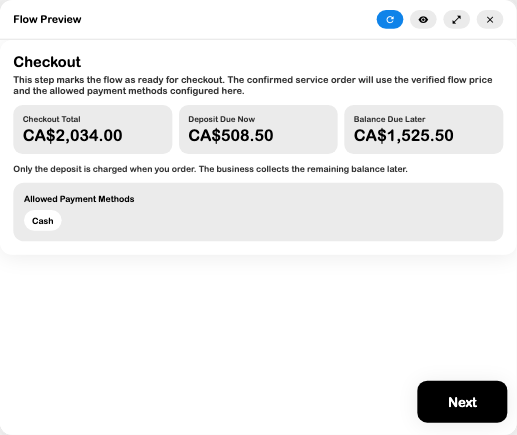
For the $2,034 CAD estimate, a 25% deposit is $508.50, leaving $1,525.50. A live deposit remains distinct from the later balance. A card invoice should not be treated as paid before the verified charge succeeds; selecting Cash does not establish that cash was received for a deposit order.
The reviewed run used an existing published intake form, a Standard service level, a $1,800 fixed calculation with a 13% illustrative tax setting, and a scheduling choice. The service page was unconnected and the flow unpublished, so this verifies the preview display rather than live payment processing. No order, checkout payment session or customer message was created.
Check before continuing
A card warning means the selected business's payment setup needs attention. Do not assume that enabling the card tile completes that setup. When a total looks wrong, inspect the calculator's currency, adjustments, actual inputs and quote connection before changing payment terms.
The current node editor exposes Pay in full and Deposit. Older documentation or stored flows may refer to other payment-term modes; do not assume an option is available unless it is offered in the current editor and supported by the final checkout path.
See Service deposits, Quote logic, Payments, and Rental security deposits.