Set up a cloud-agent task
Start with a task whose result you can inspect before expanding its responsibility. This walkthrough prepares a paused weekly bookkeeping review; it does not run the agent or change financial records.
1. Review the context
Confirm the selected business and review Business Context. Keep shared policies and business facts accurate. Personal assistant memory and a cloud agent's task outcomes have different scopes; see Agent Memory.
2. Inspect a template
Open Agents and inspect a template matching the task. The Money group includes Bookkeeper, Invoice chaser, Bills due, Payroll prep and Sales tax watch. Review the proposed instructions and timing before using them.

3. Write a bounded result
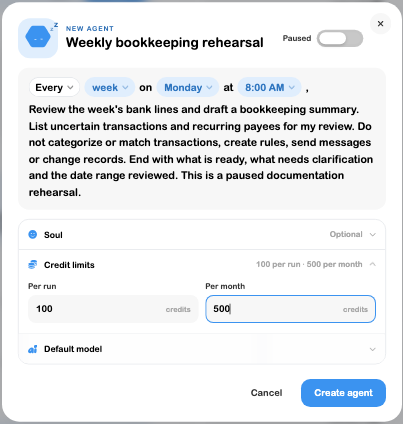
Name the task “Weekly bookkeeping rehearsal.” Ask it to inspect bank lines, identify uncertain payees and prepare a summary. Explicitly exclude categorization, matching, rule creation, customer messages and record changes when the intended task is review only.
Choose Monday at 08:00 and set the task to Paused while preparing it. In the inspected example, the credit limits were 100 per run and 500 per month. Review the applicable overall budgets too; a task's limit is not an unlimited exemption from account limits.
4. Reopen before enabling
Save the task, reload and open Edit. Confirm its instructions, paused state, schedule and limits. Check approval settings and required connections before deciding whether to enable it or use Run now.
5. Review an actual run separately
When an intended run is authorized, inspect its output and compare it with the underlying records. Check any proposed actions and approvals rather than treating a summary as evidence that changes completed. Refine instructions if the result lacks context.
The walkthrough's verified result is a saved, paused task. No run, approval decision, financial mutation or customer communication was exercised. See Agents for schedules, budgets, memory, approval boundaries and troubleshooting.