Prepare a rental for collection and return
A drain inspection camera kit needs more than a daily price. This walkthrough prepares its accessories, handover instructions and turnaround time, then shows how to keep maintenance visible. The examples are test configuration; no customer booking, payment or published rental is required to review them.
1. Describe the kit
Open Rentals → Create Rental → Tools & Construction. Enter a clear name, purpose, tags, real equipment photos and the included-parts checklist. For this example: camera reel, monitor, charger and spare battery. Explain how to collect and return it. Recheck the creation form before leaving it; the inspected version did not retain the overview reliably across routes.
See Rental listings and Templates.
2. Make the charges understandable
Continue to the flow, then review Timing & Pricing: Daily, CAD, $65, one-to-seven-day limits. Add Kit preparation · $10 per booking. Configure Extra battery · $8 and Transport case · $5 on Add-ons, with explicit maximum quantities.
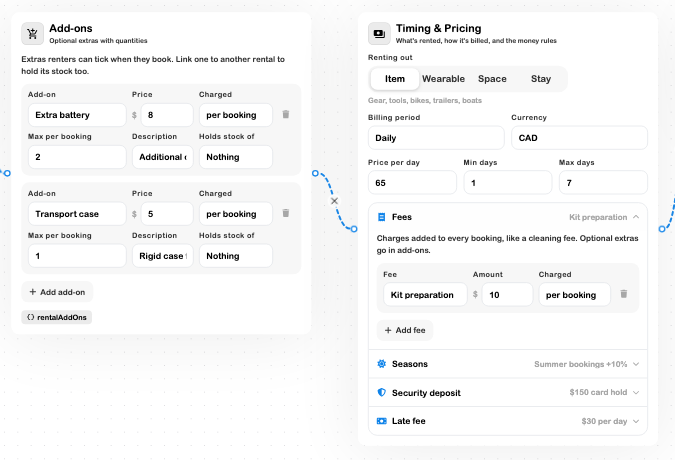
Review a seasonal adjustment only if it applies to your business. Check the customer quote for dates inside, outside and across that season. Keep the $150 card-hold security deposit separate from rental charges and from any partial payment towards the price. Configuring that policy does not authorise a card.
3. Allow time for preparation and inspection
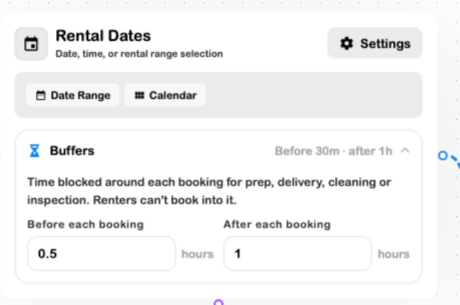
On Rental Dates, expand Buffers. The example reserves 0.5 hours before and 1 hour after. Leave each number field to commit it.
Add and connect variant, delivery and agreement steps only as required. The example's additional variant card remains an unconnected draft; connect and simulate it before using that path with customers. Verify collection coordinates before testing delivery pricing.
4. Replace generic instructions
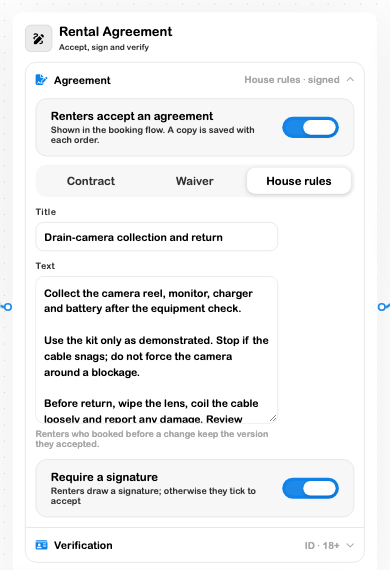
On Agreement, replace the starter text with equipment-specific collection, use and return instructions. Review the required acceptance, signature and identity settings. The camera example asks renters to stop when the cable snags, clean the lens and coil the cable loosely.
5. Plan work between bookings
On an existing rental dashboard, choose Availability → + Block time. Set a real maintenance window and reason. Use Turnover → + Task → Inspect for the work checklist. The demonstrated pipe-threader example blocks October 26 from 9 AM to noon and records the die-head, power-lead and oil check.
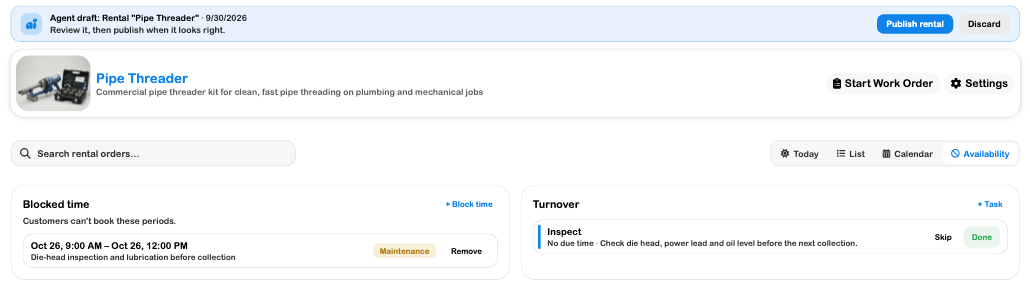
A task and a blackout do different jobs: one records work, the other reserves unavailable time. See Blackout dates and Turnover.
Before accepting the first customer
Review the listing, stock, connected flow and Simulator path, including duration limits, unavailable dates, chosen extras and final quote. Creation can save a cloud flow before the separate Publish Rental action; inspect the screen and attached version at each stage.
For real orders, use the booking and fulfillment guide to confirm, hand out, check in and close the rental. The newer operational handover and deposit actions were source-reviewed but were not completed on a compatible order in this walkthrough. They still need an end-to-end operational test before treating this as a verified live launch.