Set up a domain and shared inbox
Prepare an address that colleagues can use together, such as a visits inbox. You need control of the domain, access to its current DNS provider and permission to manage the business's mailboxes.
1. Choose the DNS arrangement
Open Assets → Add Domain → Connect Domain and enter the root domain you own. Choose Keep current DNS if you will add the supplied records at the existing provider. Choose Use SRVZR nameservers only when moving DNS management; copy existing records before switching so other services can continue working.
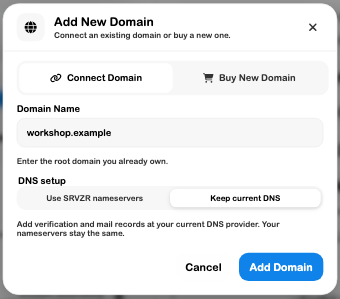
Add the domain when ready, apply the exact instructions and check verification. A domain record appearing in the list does not prove working email.
2. Prepare the shared address
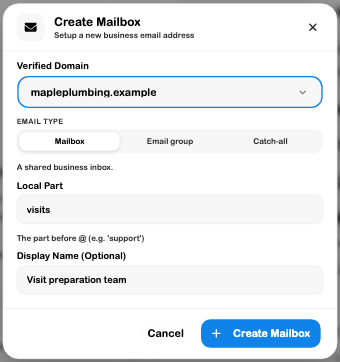
After verification, choose Create Mailbox. Select the domain, choose Mailbox, enter a local part such as visits, and add a useful display name. Review the complete address before creating it. Email group and Catch-all have different delivery behavior; see Shared Mailboxes.
3. Grant access to the right people
Open the individual mailbox's member controls. Select each colleague and review reading, sending and management access separately. General business permissions do not automatically grant access to every inbox. Confirm the address shown before saving membership changes.
4. Save a preparation draft
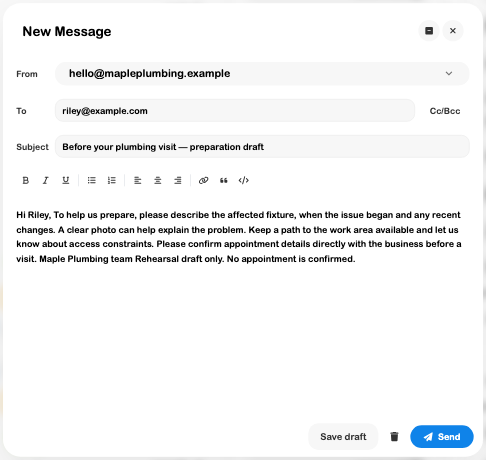
Open Mail, choose Compose and confirm From. Write the preparation instructions, then choose Save draft. Reopen it from Drafts and check the resolved recipient, subject and body.
5. Verify the real mailbox
When setup is ready, perform an intended outbound and inbound test with a recipient you have agreed to use. Inspect Sent, the received message, filtering and forwarding. Check mailbox provisioning or inbound errors before advertising the address.
The expected operational result is a verified domain, correctly scoped inbox access and confirmed delivery. This walkthrough verified draft persistence and inspected setup; public DNS, mailbox creation, permission changes and delivery were not performed.
Related guides: Custom Domains, Mail, Permissions and Website.