Prepare a robot setup rehearsal
A workshop wants to explore whether a Go2 could support inspection work. The first useful step is to identify the model, understand the software workspace and learn what still needs a connected-device test. Naming a robot or rendering a model does not establish that it can perform an inspection.
This walkthrough uses only configuration drafts and a browser simulation. It creates no robot credentials, GitHub repository, training job or physical command.
1. Inspect a matching policy setup
Open Policies → Create Policy. Enter Go2 standing rehearsal, select the shipped Unitree Go2 Stand Transition template and choose the Go2 scene.
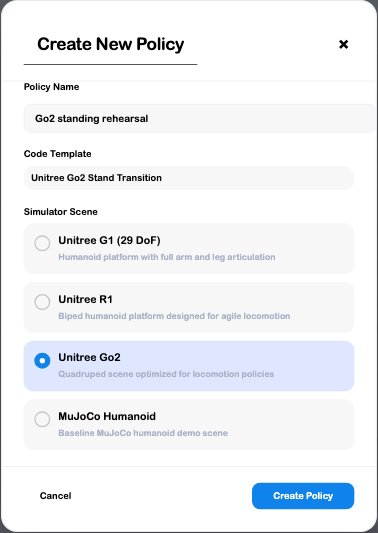
Review the creation action: completing it attempts to initialize a repository. For this configuration-only rehearsal, choose Cancel. A draft is enough to inspect the choices, but does not prove that repository authorization works.
2. Distinguish a scene from running behavior
The browser Policy Trainer can display a model and simulation controls. In this review, the Go2 scene loaded, Reset returned its starting state and Get State produced a state message.
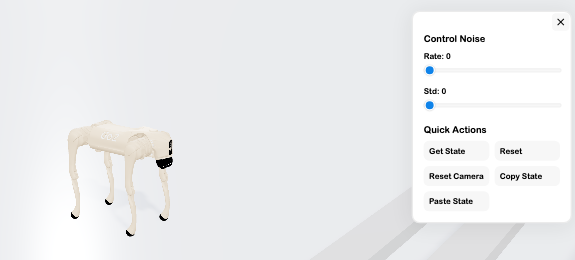
Use Simulator lessons to learn supported controls in their intended environment. Keep lesson results, policy execution and physical robot performance as separate checks.
3. Inspect unit setup without generating a claim
Open Servos → Add Servo, choose Unitree Go2, and enter Workshop inspection Go2.
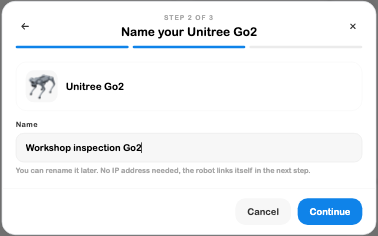
A model card represents a type; a unit record represents the particular robot. Neither proves a device is online. Cancel the rehearsal before Continue if you are only inspecting setup.
4. Identify the remaining evidence
Before a real inspection workflow, an authorized operator still needs to enroll the intended robot, verify its reported identity and software, establish a usable session, and test the actual required sensor and control behavior.
Check remote-operation requirements for video, arms and room scanning, and Policies for checkpoint and deployment distinctions. A business Stint needs its own defined scope and fulfillment setup; a simulation does not create that offer or prove successful delivery.
There were no linked robots in the reviewed business. No live telemetry, physical operation, sensor scan or deployment was demonstrated, and no empty connection view was used to imply otherwise.